
Please click "Continue" or you will be logged out.
Logging out
Manage Your Debit Card with Card Control
Card Control gives you the ability to manage your debit card right from Online Banking or the Mobile App. You can freeze a lost or stolen card, set spending limits, manage alerts, and add travel memos so your card works smoothly while you're away from home.
Freeze or Unfreeze Your Card
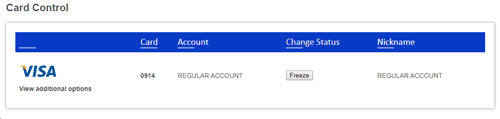
To manage your cards, go to User Settings on the Online Banking site or the More menu on the mobile app. Then select on Card Controls. If your debit card is lost or stolen, click the Freeze button next to the card in the Change Status column to immediately block all transactions. If you later find your card and it was not stolen, click the Unfreeze button to allow transactions again.
View and Update Card Details
Click the card icon or card number to view additional options for that card, including Card Information, Contact Information, Transaction Alerts, and Travel Memos.
Card Information
This section shows the last 4 digits of your card number and account type, along with the following options:
Nickname – Give your card a custom name for easy identification in the main card view.
Freeze – Temporarily block all transactions on this card until you turn the option off.
Transaction Limit – Enter a dollar amount to block any transactions greater than that amount. Transactions equal to or below the limit will still be allowed.
Freeze International – Turn this on to allow only U.S.-based transactions.
In Person Only – Turn this on to block all Internet, fax, and telephone transactions.
Click Save to apply any changes you make to your Card Information.
Contact Information
Add or update your Primary Email, Secondary Email, and SMS Phone Number. This information is used to deliver any Transaction Alerts you set up below. Click Update Contact Information to save your changes.
Transaction Alerts
Choose which types of transactions will trigger an alert to your contact information on file:
International – Alerts you when a transaction originates outside of the U.S.
Internet – Alerts you when a card-not-present transaction occurs online.
System – Alerts you when your card account is modified.
Fraud – Alerts you when a transaction is flagged by our fraud detection system.
Transaction Amount / High Dollar Threshold – Alerts you when a transaction exceeds the dollar amount you specify.
Click Update Alerts to save your changes.
Travel Memos
Planning a trip? Add a Travel Memo so your card continues to work smoothly outside of your home state. To add a Travel Memo, provide the following:
Email / Phone – A valid email address and phone number where you can be reached during your trip.
Trip Name – A custom name to help you identify this travel plan.
Memo – Optional additional notes about your trip.
Start Date / End Date – The dates of your travel plan.
Location – The states you'll be visiting. Be sure to include any states you'll be traveling through on the way to your destination.
Click Add Travel Memo to save and activate your travel plan.